Whats a UPS? The Ultimate Guide to Understanding Uninterruptible Power Supplies in 7 Simple Steps

Whats a UPS and Why Is It Important?
If you’ve ever wondered whats a ups, you’re not alone. Power problems such as outages, surges, and voltage drops happen more often than we realize. A UPS, or Uninterruptible Power Supply, is a device designed to protect electronic equipment from these unexpected power issues.
At its core, a UPS provides backup power when the main electricity supply fails. More importantly, it gives you enough time to safely shut down devices like computers, servers, and networking equipment. This small window can prevent major data loss, hardware damage, and costly downtime.
In today’s digital world, where nearly everything relies on electricity, understanding whats a ups is essential for homes, offices, and businesses alike.
Simple Definition of a UPS
A UPS is a battery-powered device that supplies emergency power to connected equipment when the main power source fails. Unlike generators, a UPS activates instantly, ensuring there is no interruption at all.
See also: Brighten Your Home with Innovative Rooflight Solutions That Inspire
The Purpose of a UPS in Daily Life
The main purpose of a UPS is protection. It safeguards devices against:
- Sudden power outages
- Voltage fluctuations
- Power surges and spikes
- Electrical noise
These issues can silently damage electronics over time, even if the power doesn’t go out completely.
How a UPS Works Step by Step
Understanding whats a ups becomes easier when you know how it works behind the scenes.
Power Flow During Normal Operation
When electricity is stable, the UPS allows power to flow directly from the wall outlet to your devices. At the same time, it keeps its internal battery charged and ready.
What Happens During a Power Outage
The moment the power fails or drops below safe levels, the UPS switches to battery mode. This switch happens in milliseconds, so your devices continue running without interruption. You can then save your work and shut down safely.
Main Types of UPS Systems
Not all UPS systems are the same. Choosing the right one depends on your needs.
Standby (Offline) UPS
This is the most basic and affordable type. It switches to battery power only when an outage occurs. It’s commonly used for home computers and small office setups.
Line-Interactive UPS
This type offers better protection by correcting minor voltage fluctuations without switching to battery mode. It’s ideal for small businesses and network equipment.
Online (Double-Conversion) UPS
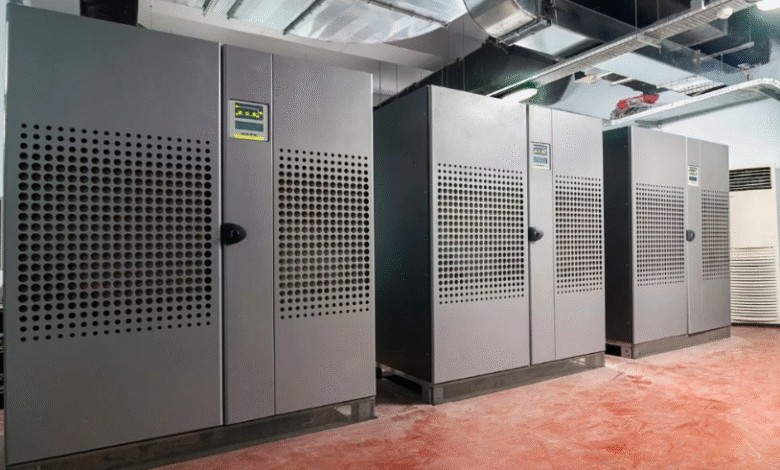
The most advanced option, this UPS continuously converts incoming power to clean, stable electricity. It’s commonly used in hospitals, data centers, and industrial environments.
Common Uses of a UPS
Many people think UPS systems are only for computers, but their applications go far beyond that.
Home and Office Equipment
A UPS is widely used to protect:
- Desktop computers
- Wi-Fi routers
- Modems
- Security systems
Even a short outage can disrupt work or online activities.
Data Centers and Servers
In large-scale operations, a UPS ensures uninterrupted service and prevents massive data loss. It often works alongside generators for long-term backup.
Benefits of Using a UPS
Now that you understand whats a ups, let’s look at why it’s such a valuable investment.
Data Protection
Unexpected shutdowns can corrupt files and operating systems. A UPS gives you time to save data properly, preventing permanent loss.
Equipment Longevity
Power fluctuations slowly damage electronic components. A UPS delivers clean and stable power, extending the life of your devices.
How to Choose the Right UPS
Selecting the right UPS doesn’t have to be complicated.
Power Capacity and Runtime
Check the total wattage of devices you want to connect. Choose a UPS that can handle the load and provide enough runtime for safe shutdown.
Device Compatibility
Make sure the UPS has the right number of outlets and supports sensitive electronics. Some models even include USB ports and monitoring software.
For technical standards and safety guidelines, you can refer to https://www.ieee.org for trusted electrical information.
Frequently Asked Questions About Whats a UPS
1. Whats a ups used for?
A UPS is used to provide backup power and protect electronic devices from power outages and voltage issues.
2. How long can a UPS provide power?
Runtime depends on battery size and load. It can range from a few minutes to several hours.
3. Is a UPS the same as a generator?
No. A UPS provides instant backup power, while generators take time to start.
4. Do I need a UPS for home use?
Yes, especially if you use computers, routers, or work from home.
5. Can a UPS protect against power surges?
Yes, most UPS systems include surge protection.
6. How often should a UPS battery be replaced?
Typically every 3–5 years, depending on usage and environment.
Conclusion: Why a UPS Is a Smart Investment
Now that you clearly understand whats a ups, it’s easy to see why it’s an essential device in today’s power-dependent world. From protecting valuable data to extending the life of electronics, a UPS offers peace of mind and reliability. Whether for home, office, or enterprise use, investing in a UPS is a smart and practical decision.